CineStill 800T is a tungsten film with a look people recognise straight away: cool teal shadows, warm lights, and a soft red glow around anything bright. I built a Lightroom preset that gets close to it on street photos.
What is CineStill 800T?
It is a colour negative film that CineStill makes from Kodak Vision3 500T, a motion-picture stock. They remove the remjet layer so it can be developed in normal C-41 chemistry, and they rate it at ISO 800. The film is balanced for tungsten light, around 3200K, which is why people reach for it at night.
Why does it look the way it does?
Two things. First, the tungsten balance: under warm indoor lamps colours look natural, but in daylight or cooler street light everything leans blue and teal, especially the shadows. Second, halation. With no remjet layer, light from a bright source goes through the film, bounces off the back and exposes it a second time. That leaves a red-orange glow around neon signs, street lamps and headlights.
Put cool shadows next to warm lights and you get the teal and orange you see in so many films.
How to get the look in Lightroom
Start with white balance. Go a bit cooler so the shadows lean blue, then adjust the tint until the lit areas still look right. Push the shadows towards teal and the highlights towards orange, but keep an eye on skin, which turns green faster than you expect. Lift the blacks a little, roll off the highlights, and bring Texture and Clarity down. Add a moderate amount of medium grain.
The last step is the halation. Paint a brush mask over the brightest lights only, with a red-orange tint and a soft, slightly hazy glow.
My CineStill 800T preset
I made this preset by studying real CineStill 800T photos by other photographers, in very different scenes: neon at night, rainy streets, mixed shop lighting and blue hour. Then I adjusted colour, contrast and grain until it behaved the same way on my own street photos from Hong Kong, Taipei, Lisbon and Madrid. Take it as a digital look inspired by the film.
It comes in the CineStill Pack with the BWXX, 50D and 400D presets and the Halation Brush. The files are .XMP, so they work in Lightroom Classic, Lightroom desktop and mobile, and Camera Raw.
Using the Halation Brush on every light
My tip is to paint the Halation Brush on all the lights in the photo, not only the obvious neon sign. The glow follows the real colour of each light, so every one of them shines the way it would with real halation.
Apply the 800T preset, set Exposure and White Balance for your scene, then paint over neon signs, street lamps, shop windows and headlights. If the glow looks too strong, lower the mask Amount.
Night or daylight?
800T is made for night and artificial light. In daylight it goes cooler and bluer, like the real tungsten film. For sunny days, start with the 50D or 400D presets from the same pack, or use 800T and warm up the white balance.
Before and after examples
In each example, the left side is the photo with my CineStill 800T preset applied and the right side is the original, unedited file.
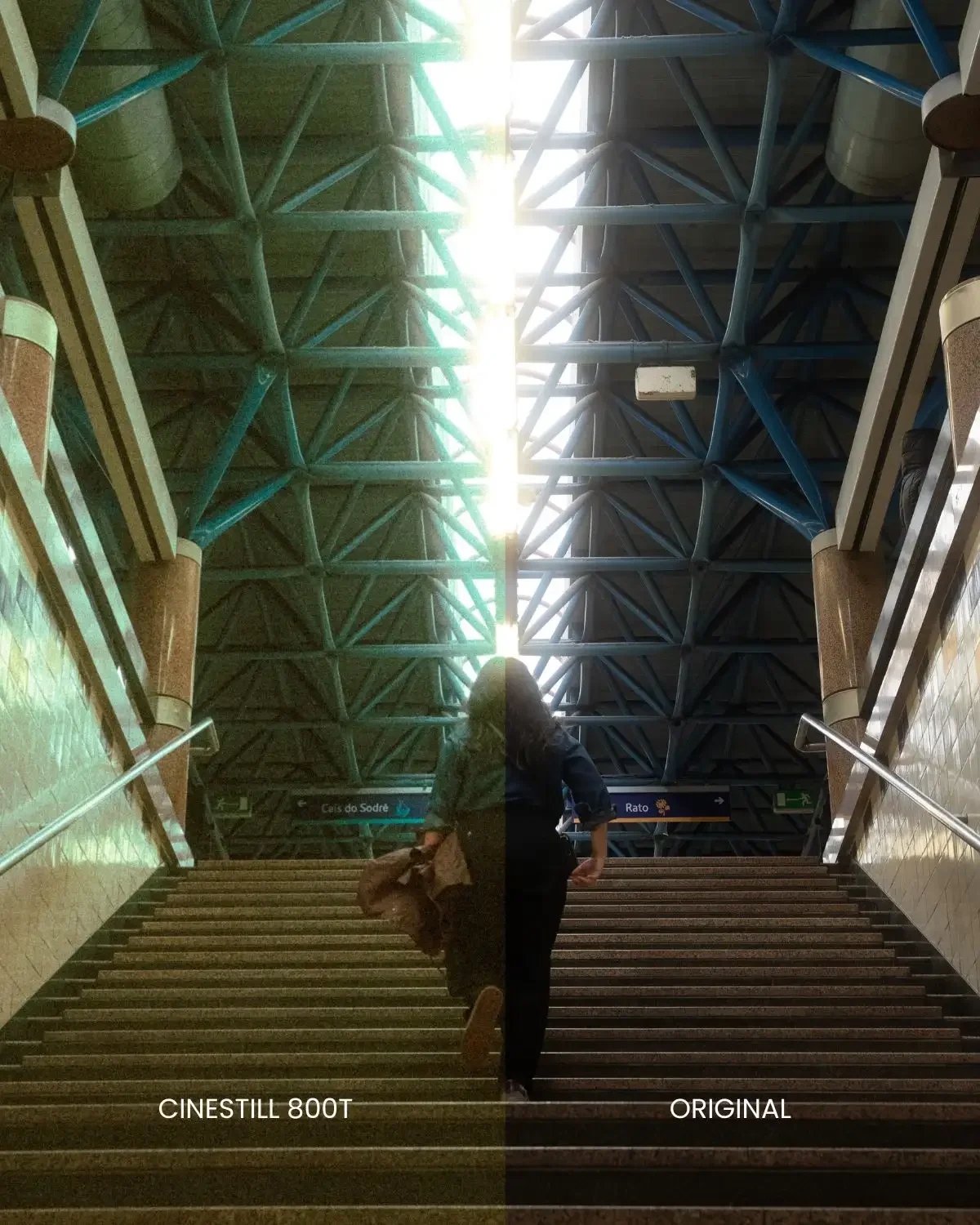
Lisbon metro, with a mix of daylight and artificial light. The steel structure turns green-teal and the bright light from above gets warmer. Look at the ceiling lights: the Halation Brush gives them a soft glow.
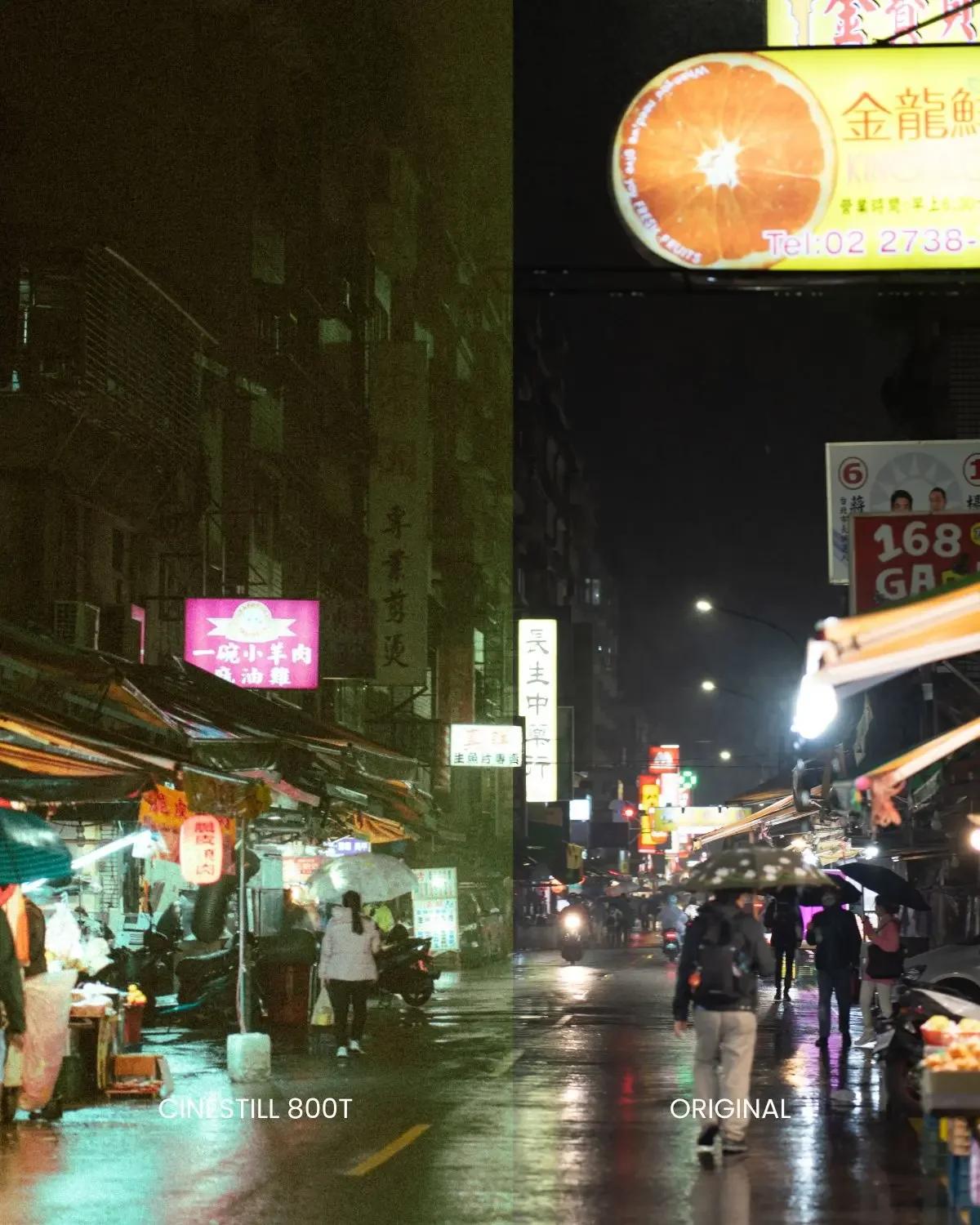
A rainy night in Taipei. The dark buildings and the wet road move towards an olive-teal, while the orange and pink signs stay warm. Wet streets are where the cool shadows and warm lights contrast most.
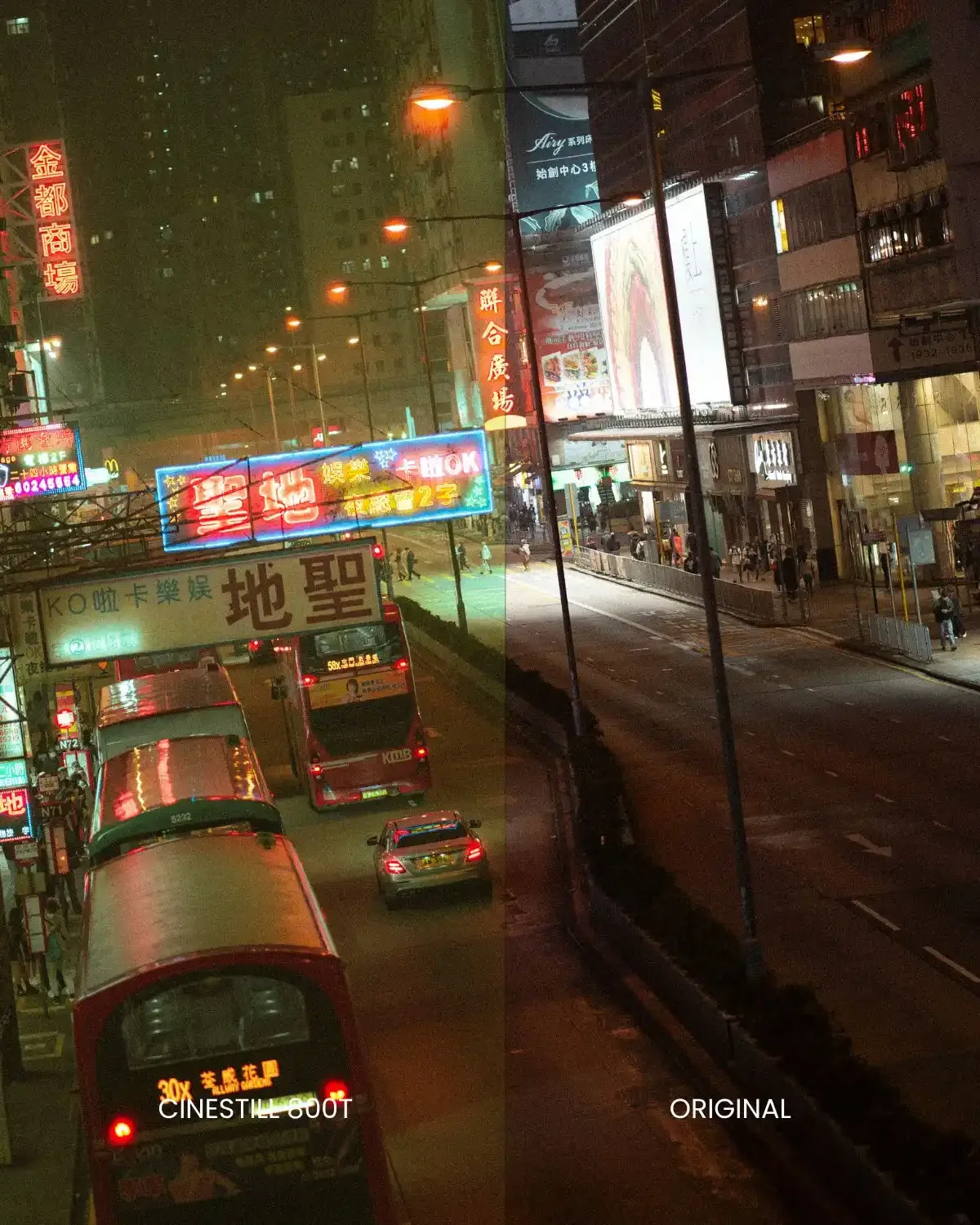
Hong Kong at night. The shadows go green-teal, the neon and shop lights stay warm, and the contrast is softer. The halation shows best here, in the red glow around the neon sign and the bus lights.
Common mistakes
Most problems come from going too far. Too much halation looks fake, so lower the mask Amount if every highlight is glowing. Crushed blacks lose the soft film feel, so keep some detail in the shadows. Teal on skin makes faces look sick, so check faces after grading and bring warmth back. And a white balance that works on one photo will not work on the next, so adjust Exposure and White Balance each time.
FAQ
Does it work in Lightroom Classic, mobile and Camera Raw?
Yes. The presets are .XMP files and work in Lightroom Classic, Lightroom desktop and mobile, and Camera Raw.
Is this the real film?
No. It is a digital preset inspired by the look of the film. CineStill, Kodak and other film names are used only to describe the look, and EJDuran Photography is not affiliated with CineStill or Kodak.
Can I use it in daylight?
Yes, but 800T is made for night and artificial light. For daylight, the 50D and 400D presets in the same pack work better.
Where can I get it?
The 800T preset is in the CineStill Pack. For night work, see also the Night Photography Bundle.
More guides
New to presets? Read How to Use Lightroom Presets Like a Pro. For more film looks, browse all my Lightroom presets.
